
Wednesday, April 14, 2010
W4BXI Test of 5 Antennas
Here is a screen shot of audio recorded at about 0835 CDT at my receiver during W4BXI's test of 5 antennas on 3740 kHz. The total time duration is just over 50 seconds. Today I had the RF gain set to max, where the S-meter readings are most 'accurate'. Yesterday I had it set some amount below max during the audio recording. Having the RF gain at max may alter the receiver's AGC action and resulting amplitude comparisons. I note that the background noise rises in amplitude before each tone transmission starts.For future audio recordings I'll make a point of reducing the receive RF gain.


Tuesday, April 13, 2010
W4BXI Antenna Traces
Here is the audio waveform recorded this morning on 75 m at WA5MLF during W4BXI's test transmissions on four different antenna configurations. The effects of signal fading (QSB) can be seen during each transmit period. The elapsed time shown is 21.55 seconds. The recording and waveform display are from CoolEdit2000, but the same features are available with the free program Audacity.

Tim WA4PTZ also made an audio recording at his station. He captured the last 3 test transmissions. Below is a dual-trace display with Tim's recording on top and WA5MLF's recording below. The elapsed time is 17.9 seconds. Click here for an mp3 copy of the composite recording.

The upper waveform gives the appearance of a steady signal from W4BXI for each tone (carrier) transmission, but it is not known how much the AGC in Tim's receiver or PC sound card affected the recording levels. Note that the noise level after each transmission rose to a level with peaks similar to the level of the steady tone (carrier).
John

Tim WA4PTZ also made an audio recording at his station. He captured the last 3 test transmissions. Below is a dual-trace display with Tim's recording on top and WA5MLF's recording below. The elapsed time is 17.9 seconds. Click here for an mp3 copy of the composite recording.

The upper waveform gives the appearance of a steady signal from W4BXI for each tone (carrier) transmission, but it is not known how much the AGC in Tim's receiver or PC sound card affected the recording levels. Note that the noise level after each transmission rose to a level with peaks similar to the level of the steady tone (carrier).
John
Wednesday, January 13, 2010
Selected computer security tools
Here are a few links about certain computer security tools that I have repeatedly suggested to friends and family members:
Off topic, but included here for convenience. See the blog posting about Technical Knock Out, a good place for recycling old computers.
- Microsoft Security Essentials -- Free antivirus / antispyware
- PC World review of beta version
- Ars Technica revew
- Secunia Software Inspector -- Use one of these to check your installed programs for vulnerabilities:
- Online Software Inspector -- scans from web page
- Personal Software Inspector -- download version that monitors PC continuously
- OpenDNS -- Can be set in your router or in each PC individually. For a laptop that is used elsewhere to access the Internet, it should be set up in the laptop even if set up in the home router. For a household with many PCs, especially children's, the router may be a good place to set it. The optional user account can enable more powerful and customized filtering of web sites.
- Password Managers
- SplashID -- I use on my PDA. It syncs with the version on my PC.
- Password Safe -- Free. Duplicates what I have on SplashID. Has a nice Auto Type feature that provides single-keystroke entry of userid & password at a web site's log-in screen.
- LastPass -- A web-based password manager; I have not used it.
- File Shredder -- Can process individual files or entire folders and their subfolders with contained files. Example of the latter usage is to shred the entire "Documents and Settings" folder of a PC being recycled or discarded.
- CCleaner -- Excellent product for cleaning up software debris that accumulates in your PC.
- Drop My Rights -- A free utility from Microsoft that reduces the administrative rights of a web browser, email program, or media player to prevent most accidental installations of malicious software when using these routine programs.
Off topic, but included here for convenience. See the blog posting about Technical Knock Out, a good place for recycling old computers.
Tuesday, December 8, 2009
AT&T U-verse Observations
 I got AT&T U-verse installed on 12/3/09, with 2 TVs and 2 PCs connected. Because of an older analog modem in my monitored home alarm system, I declined the U-voice VoIP portion of the service bundle, keeping the voice phone service on its existing arrangement. The alarm company's solution for using VoIP is to avoid it by using a cellular data connection. This would have involved an equipment upgrade of about $150 plus an $8 increase in the monthly alarm monitoring fee.
Click here to access a captioned photo set showing the U-verse equipment and a few selected (standard definition) TV screen photos.
I captured some connection data from the 2Wire 3800HGV-B which serves as a residential gateway for the three U-verse services. Here is a portion of the DSL Connection Detail screen:

A speed test from one of the PCs gave the results shown below. Since I ordered the same Internet speed bracket that I was previously using on ADSL, the download speed is limited to 3 Mb/s max. The upload speed is significantly better than what I had on ADSL.

This morning I tested for VDSL noise impacts on amateur radio reception. I noted a high level of white noise near the top of the 75 m band, but nothing noticeable on 40 m.
- 3.9 - 4.0 MHz -- S9
- 3.85 to about 3.9 MHz -- S6
- 3.80 to about 3.85 MHz -- S4
- 3.75 MHz -- below S2
Update 12/9/09: This morning I see only S2 noise floor on 75 m. I'll need to check this on multiple days, cycling power to the gateway, to be sure about the noise origin.
Update 12/11/09: Additional testing on multiple days failed to confirm a correlation between presence of white noise on 75 m and the state of my gateway. Generally the white noise is very low or absent in early morning and late afternoon or night, but seems to rise mid-morning thru mid-afternoon.
Update 12/11/09: Additional testing on multiple days failed to confirm a correlation between presence of white noise on 75 m and the state of my gateway. Generally the white noise is very low or absent in early morning and late afternoon or night, but seems to rise mid-morning thru mid-afternoon.
In the past I experienced occasional interference to my ADSL connection when transmitting on 75 m. This was later resolved when the drop wire and inside wiring connections were cleaned and reterminated at the network interface. There was no recurrence of this problem to ADSL, or to VDSL while transmitting around 3.74 MHz. However, transmitting on 3.97 MHz caused the VDSL gateway to loose sync. This condition is probably related to the proximity of antenna and aerial drop as discussed above.
I need to do more (online) reading as I explore the service performance and impacts further. Some resources are:
- U-talk Peer-to-Peer Forums
- DSL Reports U-verse Forum
- eHam.net forum
- QRZ.COM forum
- ARRL TIS - Possible Impact of VDSL on Stations Operating in the Amateur Radio Service
JK
Tuesday, December 1, 2009
Frequency Analysis of W4BXI Keying

Here are two views of the audio recording of W4BXI's keying. (Click on the image to magnify.) The first shows amplitude vs frequency for a portion of the initial dit. A fairly sharp peak is seen near 622 Hz. The amplitude above the peak rolls off more slowly than I expected, and this shape is also seen when I analyze just the noise waveform between CW characters. It might relate to the audio filter mode or some other noise entering the recording.

The second figure shows the amplitude and frequency content vs time as in the previous post for the recording of keying from KB4XX. Except for some brief additional high-frequency content near the beginning and end of each CW character, the tone is steady for the duration of each character.
Many, many other views can be obtained by choosing the time portion of a waveform to be analyzed.
-- John
Key chirp -- another view

I selected another view in the Cool Edit 2000 program to help illustrate what the ear easily tells us about chirp in the CW sample from KB4XX. Above is a spectral view showing the initial dah and the following dit sent in the semi-break-in mode. Click on the image to magnify.
This graph plots frequency on the vertical axis, in a limited set of discrete bands, and time on the horizontal axis. Intensity is represented by color, with light colors on the high end of the range, and dark colors on the low end. A steady tone is seen by the solid horizontal bar in the 700 - 1000 Hz range for most of the dah and the dit. The early part of the initial dah shows instability represented by the bright spots above and below the 700 - 1000 Hz band.
Next I'll post corresponding views of the keying sample from W4BXI. All analysis views are based on the audio waveforms recorded from W4UOA's receiver.
-- John
Wednesday, November 25, 2009
Frequency Analysis of Key Chirp
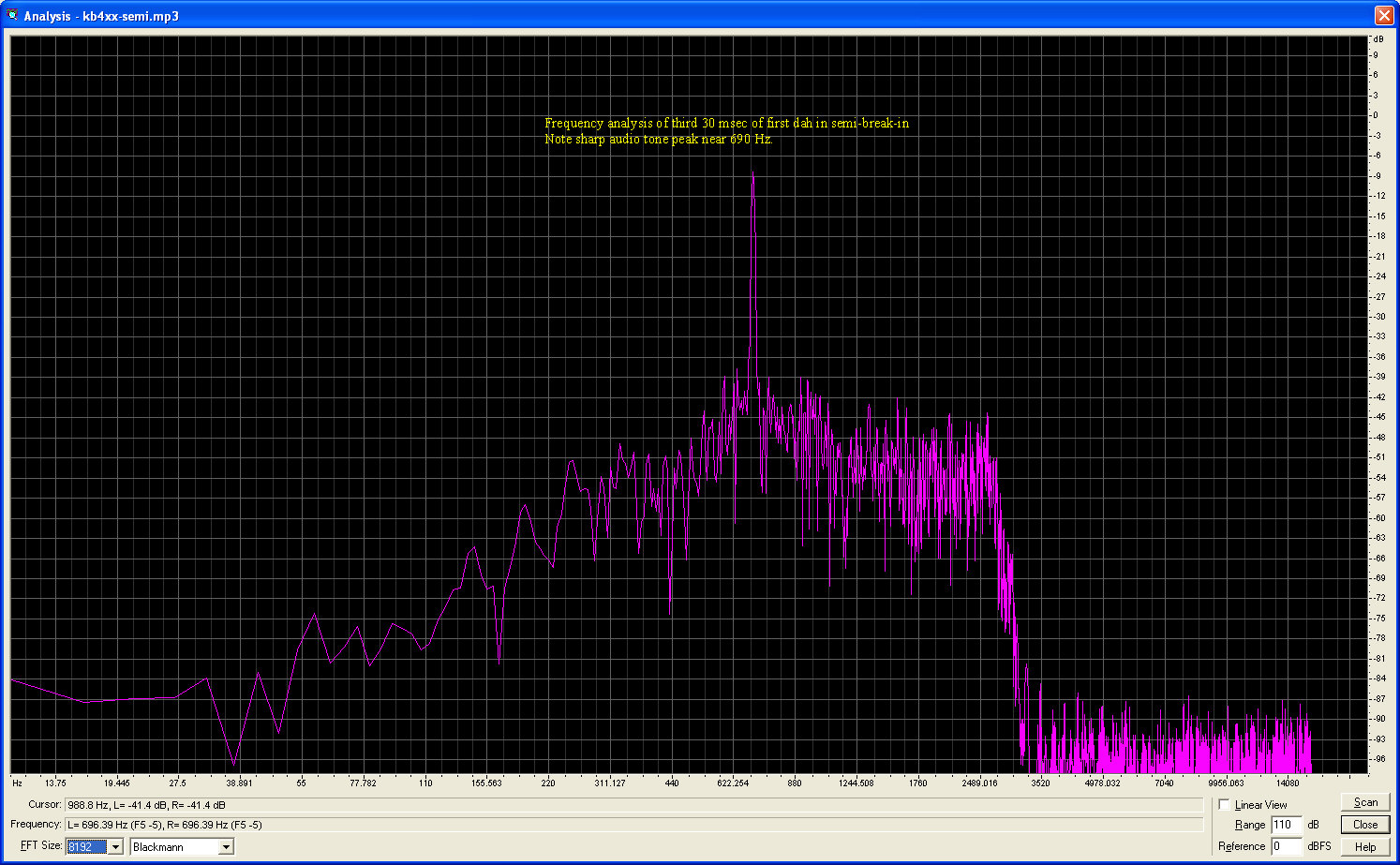
During a discussion of key chirp on Phil's transceiver, I offered to do a spectrum analysis of the recordings made by Carl. While listening to selected slices of the audio I concluded that the chirp is most noticeable on the initial character sent on semi break-in and on the first character of a letter sent on full break-in.
I used Cool Edit 2000 to analyze the following slices of the audio waveforms:
The annotated screen shots are shown below. Click on any one for an expanded view. All have background noise showing in the upper part of the spectrum. The area of interest is the tone peak around 690 Hz.


I used Cool Edit 2000 to analyze the following slices of the audio waveforms:
- First 30 msec of the first character sent on semi break-in
- Third 30 msec of the first character sent on semi break-in. This allowed some time for the pitch to stabilize.
- First 30 msec of the initial dah sent in full break-in
- Third 30 msec of the initial dah sent in full break-in
The annotated screen shots are shown below. Click on any one for an expanded view. All have background noise showing in the upper part of the spectrum. The area of interest is the tone peak around 690 Hz.



Subscribe to:
Comments (Atom)