Tuesday, December 8, 2009

AT&T U-verse Observations

I got AT&T U-verse installed on 12/3/09, with 2 TVs and 2 PCs connected. Because of an older analog modem in my monitored home alarm system, I declined the U-voice VoIP portion of the service bundle, keeping the voice phone service on its existing arrangement. The alarm company's solution for using VoIP is to avoid it by using a cellular data connection. This would have involved an equipment upgrade of about $150 plus an $8 increase in the monthly alarm monitoring fee.

Click here to access a captioned photo set showing the U-verse equipment and a few selected (standard definition) TV screen photos.


I captured some connection data from the 2Wire 3800HGV-B which serves as a residential gateway for the three U-verse services. Here is a portion of the DSL Connection Detail screen:


A speed test from one of the PCs gave the results shown below. Since I ordered the same Internet speed bracket that I was previously using on ADSL, the download speed is limited to 3 Mb/s max. The upload speed is significantly better than what I had on ADSL.


This morning I tested for VDSL noise impacts on amateur radio reception. I noted a high level of white noise near the top of the 75 m band, but nothing noticeable on 40 m. I powered off the gateway and observed that the noise on 75 m disappeared. Next I unplugged all devices that connected to the LAN side of the gateway and powered it up. The white noise returned on 75 m at the following levels:
  • 3.9 - 4.0 MHz -- S9
  • 3.85 to about 3.9 MHz -- S6
  • 3.80 to about 3.85 MHz -- S4
  • 3.75 MHz -- below S2
Since no LAN cables were connected, I concluded that the noise pickup is via the 75 m leg of my fan dipole that crosses about 6' above the aerial drop wire at about a 30ยบ angle. The 40 m leg of the dipole does not pass near the aerial drop. Rearranging the 75 m leg would probably reduce the interference.

Update 12/9/09: This morning I see only S2 noise floor on 75 m. I'll need to check this on multiple days, cycling power to the gateway, to be sure about the noise origin.

Update 12/11/09: Additional testing on multiple days failed to confirm a correlation between presence of white noise on 75 m and the state of my gateway. Generally the white noise is very low or absent in early morning and late afternoon or night, but seems to rise mid-morning thru mid-afternoon.

In the past I experienced occasional interference to my ADSL connection when transmitting on 75 m. This was later resolved when the drop wire and inside wiring connections were cleaned and reterminated at the network interface. There was no recurrence of this problem to ADSL, or to VDSL while transmitting around 3.74 MHz. However, transmitting on 3.97 MHz caused the VDSL gateway to loose sync. This condition is probably related to the proximity of antenna and aerial drop as discussed above.

I need to do more (online) reading as I explore the service performance and impacts further. Some resources are:

JK

Tuesday, December 1, 2009

Frequency Analysis of W4BXI Keying


Here are two views of the audio recording of W4BXI's keying. (Click on the image to magnify.) The first shows amplitude vs frequency for a portion of the initial dit. A fairly sharp peak is seen near 622 Hz. The amplitude above the peak rolls off more slowly than I expected, and this shape is also seen when I analyze just the noise waveform between CW characters. It might relate to the audio filter mode or some other noise entering the recording.


The second figure shows the amplitude and frequency content vs time as in the previous post for the recording of keying from KB4XX. Except for some brief additional high-frequency content near the beginning and end of each CW character, the tone is steady for the duration of each character.

Many, many other views can be obtained by choosing the time portion of a waveform to be analyzed.

-- John

Key chirp -- another view


I selected another view in the Cool Edit 2000 program to help illustrate what the ear easily tells us about chirp in the CW sample from KB4XX. Above is a spectral view showing the initial dah and the following dit sent in the semi-break-in mode. Click on the image to magnify.

This graph plots frequency on the vertical axis, in a limited set of discrete bands, and time on the horizontal axis. Intensity is represented by color, with light colors on the high end of the range, and dark colors on the low end. A steady tone is seen by the solid horizontal bar in the 700 - 1000 Hz range for most of the dah and the dit. The early part of the initial dah shows instability represented by the bright spots above and below the 700 - 1000 Hz band.

Next I'll post corresponding views of the keying sample from W4BXI. All analysis views are based on the audio waveforms recorded from W4UOA's receiver.

-- John

Wednesday, November 25, 2009

Frequency Analysis of Key Chirp

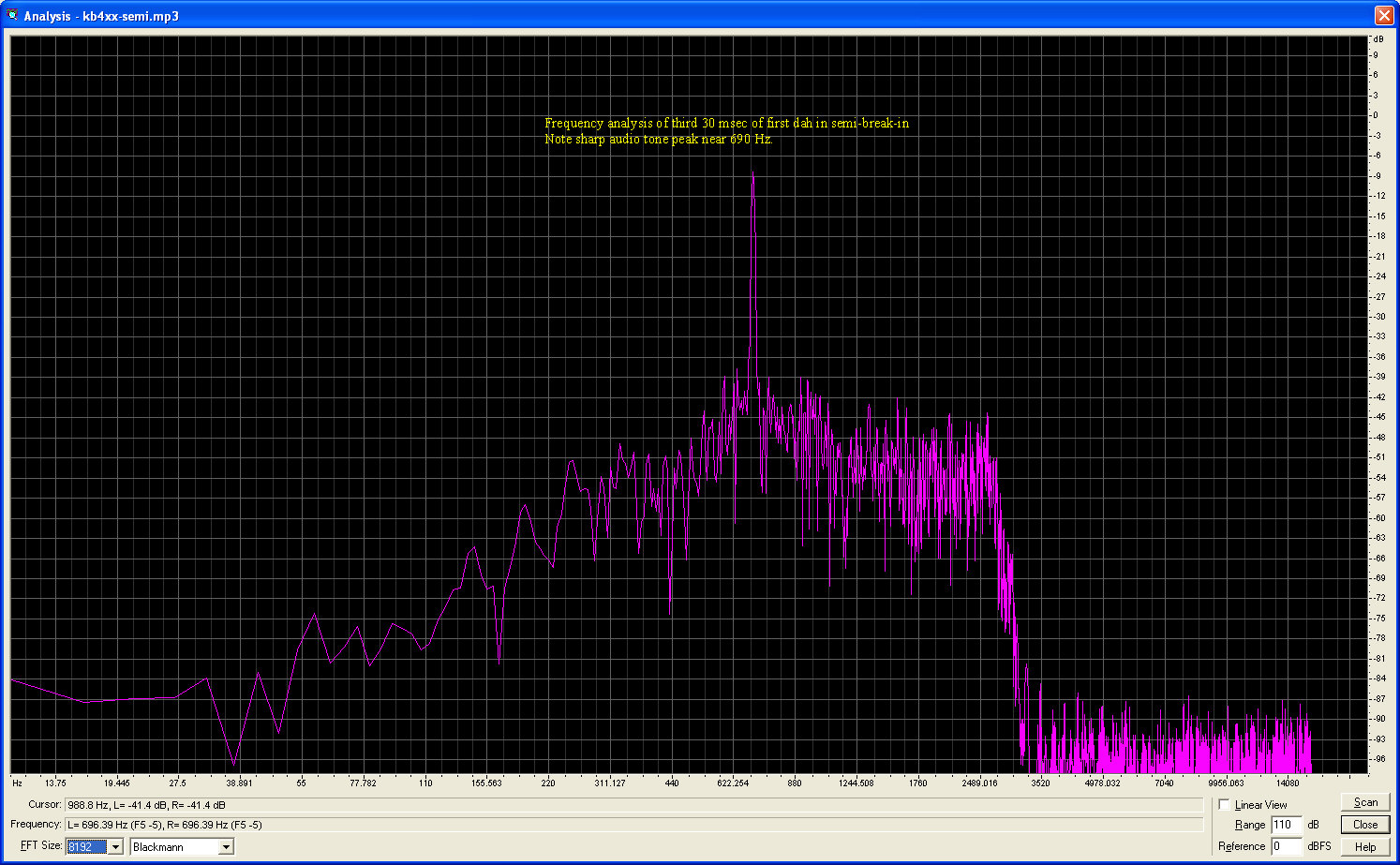
During a discussion of key chirp on Phil's transceiver, I offered to do a spectrum analysis of the recordings made by Carl. While listening to selected slices of the audio I concluded that the chirp is most noticeable on the initial character sent on semi break-in and on the first character of a letter sent on full break-in.

I used Cool Edit 2000 to analyze the following slices of the audio waveforms:
  • First 30 msec of the first character sent on semi break-in
  • Third 30 msec of the first character sent on semi break-in. This allowed some time for the pitch to stabilize.
  • First 30 msec of the initial dah sent in full break-in
  • Third 30 msec of the initial dah sent in full break-in
The same analysis can be done with the Audacity program.

The annotated screen shots are shown below. Click on any one for an expanded view. All have background noise showing in the upper part of the spectrum. The area of interest is the tone peak around 690 Hz.


Sunday, September 6, 2009

Web log-in storage by Intenet Explorer

Most if not all web browsers provide the convenience of storing usernames and passwords for logging into web sites that require them. While I do not recommend using a web browser to store log-in data for very important or sensitive web accounts, the service can be convenient for other web accounts. For your most important log-in data I recommend a program such as Password Safe. This program saves your data in an encrypted file that you can easily save on back-up media, too.

Some web browsers let you access stored log-in data easily, and provide the option of password protecting the stored data. However, this 'master password' feature is not as secure as a dedicated password program.

Log-in data (usernames and passwords) stored by Internet Explorer (IE) are not accessible within IE. When you access a web site log-in page that uses the stored data, your username will be visible, but the password will be obscured. If you have stored such data while browsing with IE and later need to view it, because you don't have it saved elsewhere, you will need to use a third-party software tool or an obscure procedure.

This web page discusses the protected storage used by IE and provides links to several tools for accessing the stored data. Most of the tools listed are priced at $39. One is offered free of charge. Another page features such a tool for $10. I cannot advise about the effectiveness or trustworthiness of such tools.

In summary, be cautious about where you store web account log-in data so that it is secure but also accessible when needed.

Monday, August 31, 2009

4 years after Hurricane Katrina

Here are two reports I found interesting from the weekend news:

New Orleans four years after Katrina
Profiles a couple who built a new home to replace their flooded home next to the London Ave Canal.
This page includes a link to a nice narrated slide show from 2008 that includes a view of the family's house plans -- exterior views.

La. Family Finishes Rebuilding, But Struggles Go On
This is the 13th interview of the Bordelon family, who rebuilt their home in St. Bernard Parish. The web page has links to their 12 earlier interviews.
Sadly, the 1/25/2010 program reported the passing of Donald Bordelon.

John

Monday, June 1, 2009

Laptop Online with Puppy Linux

After installing a 64 M memory module donated by KE4ID (thanks, Jack!), I powered up the Dell Inspiron 3000 and booted up with Puppy Linux. The resulting 233% increase in available RAM provided a nice boost to the laptop PC's performance -- much less frequent hard disk access. Puppy Linux is happy to run with the current total of 112 M of RAM.

I resumed efforts to get the PC Card (aka PCMCIA) Ethernet interface configured to enable LAN / WAN access. With some guidance from online forums about configuring Linux on older hardware, I got the Ethernet card working (as it did under Windows ME that I inherited with the PC). Here is a photo of the screen showing the Bell Ringers home page displayed by the SeaMonkey browser that is part of the Puppy Linux distribution.

I've now verified the PC's ability to access the Internet via Linux, for web browsing and email access. Next I will work on achieving Java applet operation.